Your Sales Team Is Researching More Than Selling
Here's something we see in almost every sales team we work with.
Reps spend the first hour of their day researching. Scrolling LinkedIn. Checking company websites. Trying to figure out who to reach out to and what to say. Then they open the CRM, manually log what they found, write a generic email, and hope for the best.
By the time they actually start selling, half the morning is gone.
The old prospecting playbook - manual research, cold lists, generic outreach templates - worked when there were fewer tools and fewer competitors. It doesn't scale anymore. Not when buyers expect relevance from the first touchpoint.
HubSpot's Prospecting Agent, combined with enrichment tools like Apollo, ZoomInfo, or Surfe, changes how this works. Not by replacing your reps. By giving them a structured system that does the research, surfaces the right people, and drafts personalised outreach - so they can focus on conversations instead of tab-switching.
We've been setting this up for clients, and we wanted to share the framework we use. It's four steps. Simple to understand, powerful when it's running properly.
━━━━━━━━━━━━━━━━━━━━━━━━━━━━━━━━━━━━━━━━━━━━━━━━━━
The Framework: Signal, Committee, Context, Outreach
Most prospecting fails because it starts in the wrong place. Reps begin with a list of names and try to manufacture a reason to reach out. That's backwards.
Good prospecting starts with a reason - a signal that something has changed at a company - and works forward from there.
Here's the four-step framework we use when setting up Prospecting Agent for clients:
Step 1: SIGNAL - Watch for Buying Triggers
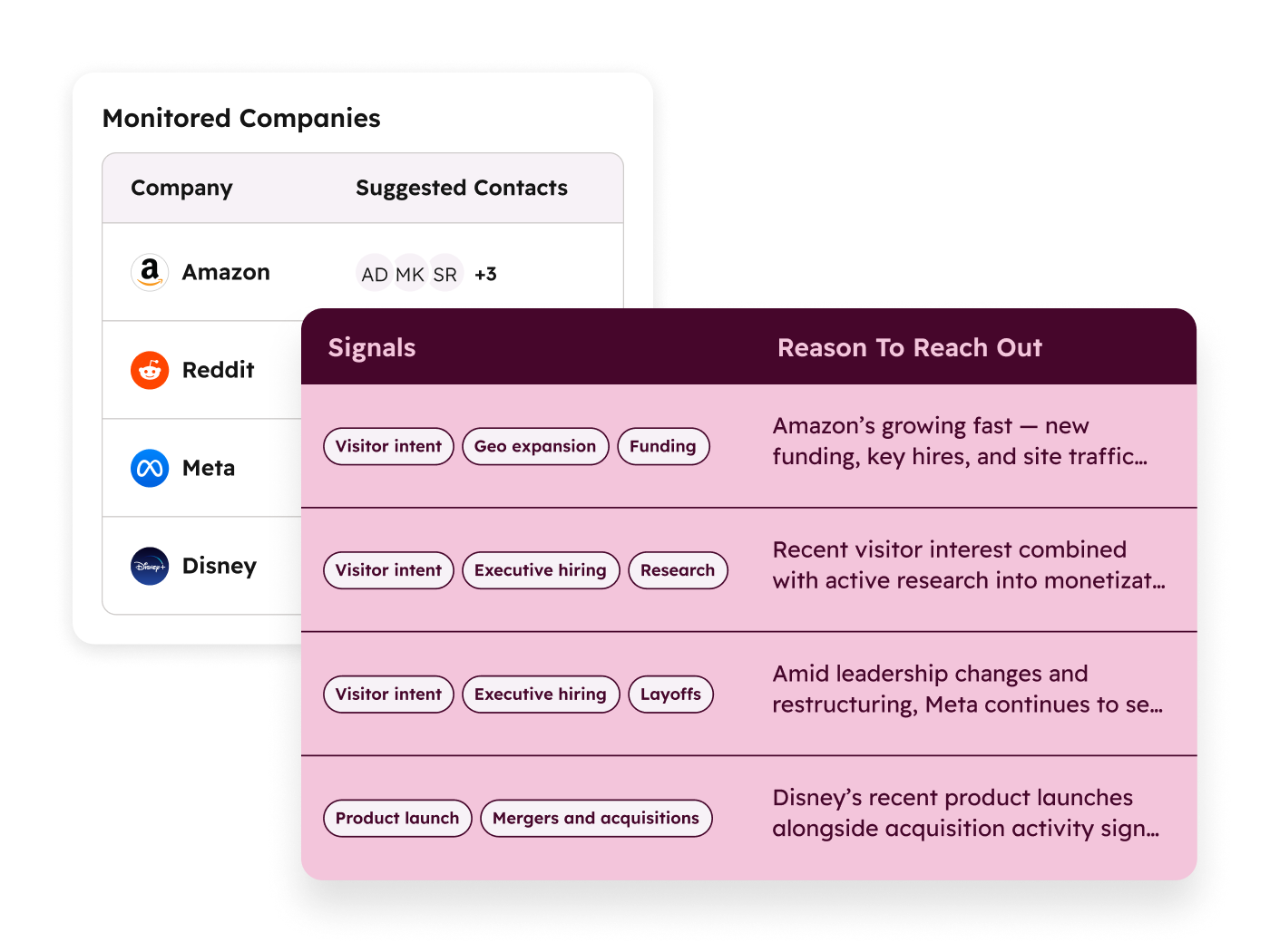
Before you reach out to anyone, you need a reason. Not a manufactured reason. A real one.
Buying signals are events that suggest a company might be ready for what you offer. These include:
- Funding rounds - A company just raised capital. They're hiring, scaling, and investing in infrastructure. That's a window.
- Job postings - If they're hiring a Head of Revenue Operations or a CRM Manager, they're building the systems your product supports.
- Technology adoption - They just adopted a new marketing platform or switched CRMs. Integration and setup help is probably on their mind.
- Leadership changes - A new VP of Sales or CMO often means new priorities, new budgets, and a willingness to evaluate vendors.
- Expansion signals - New office locations, market entries, or product launches all suggest growth that needs supporting infrastructure.
The key here is specificity. You don't set up one generic signal monitor. You create different signal profiles for different segments of your market. What triggers outreach to an enterprise construction company is different from what triggers outreach to a mid-market SaaS startup.
HubSpot's Prospecting Agent lets you define these profiles and monitor for them continuously. When a signal fires, the system moves to step two.
Step 2: COMMITTEE - Source the Full Buying Group
This is where most prospecting falls short.
A rep finds one contact - maybe the person whose job posting triggered the signal - and starts outreach to that single person. But B2B buying decisions don't happen with one person. There's a committee. There's a decision maker, an influencer, a technical evaluator, a budget holder, and sometimes a champion who's already sold on the idea internally.
When a signal fires, the next step is to source the full buying committee. This is where Apollo, ZoomInfo, or Surfe earn their keep.
Instead of pulling one name and one email, you pull:
- Decision makers - VP/C-level who signs off on budget
- Influencers - Directors and managers who shape the shortlist
- Technical evaluators - The people who'll actually use or implement what you're selling
- Champions - Internal advocates who might already be familiar with your solution
- Blockers - Procurement, legal, or finance contacts who can slow things down if not engaged early
Each person gets identified with their role in the buying process, not just their job title. A "Marketing Manager" might be the champion at one company and the technical evaluator at another. Context matters.
The result: your rep isn't reaching out to one person and hoping they forward the email. They're engaging the whole group with role-appropriate messaging.
Step 3: CONTEXT - Pull CRM History Before Reaching Out
This is the step most teams skip entirely. And it's the one that makes the biggest difference.
Before any outreach gets drafted, the system checks your CRM for history with that account. Has anyone from your company talked to them before? Was there a deal that went cold six months ago? Did they attend a webinar last quarter? Has a different rep already been in touch with someone at that company?
This matters for two reasons.
First, it prevents embarrassing situations. Nothing kills credibility faster than reaching out to a company your colleague already has a relationship with, or pitching a product they already evaluated and declined.
Second, it gives your rep a starting point. Instead of opening with "Hi, I noticed your company..." they can open with actual context. "We spoke with your team back in October about X. I noticed you've just brought on a new Head of Operations, and I thought it might be worth reconnecting."
That's a completely different conversation. It starts warm, not cold.
HubSpot's Prospecting Agent pulls this history automatically. Past interactions, deal stages, email exchanges, meeting notes, form submissions - it's all there. Your rep starts with context, not a blank page.
Step 4: OUTREACH - Draft Personalised Messages Per Stakeholder
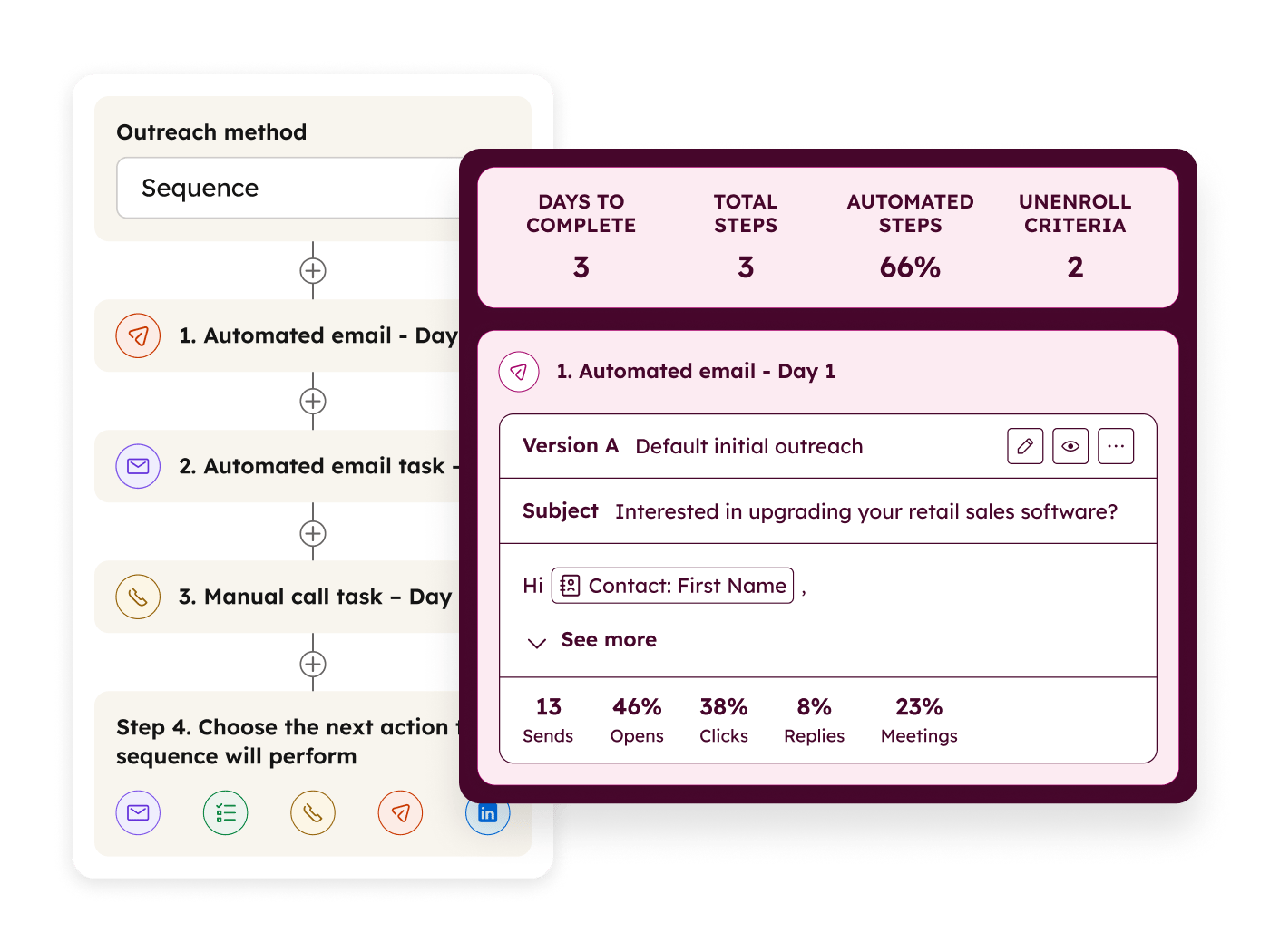
Now - and only now - does outreach get drafted.
And it's not a template. Not a "Hi [First Name], I noticed [Company] is growing..." mail merge.
The outreach is drafted per stakeholder, based on three inputs:
1. The signal - What triggered the outreach? Funding? A job posting? A tech adoption? The message references this.
2. Their role - A CFO gets a different message than a Marketing Director. The CFO hears about ROI and cost consolidation. The Marketing Director hears about campaign attribution and lead quality.
3. CRM history - If there's past interaction, the message builds on it. If there's none, the message is transparent about that.
The Prospecting Agent drafts these messages. Your rep reviews them, adjusts the tone, adds anything personal they know, and sends. The AI does the research and the first draft. The human adds judgment and warmth.
This isn't about automating outreach to the point where it feels robotic. It's about making sure every message has a reason, a reference, and relevance. Three things that generic templates never have.
━━━━━━━━━━━━━━━━━━━━━━━━━━━━━━━━━━━━━━━━━━━━━━━━━━
Buying Profiles: Different Segments, Different Rules
One of the most powerful parts of this framework is the ability to run multiple prospecting profiles simultaneously.
Think about it this way. If you sell to both enterprise construction companies and mid-market B2B services firms, those two segments have completely different buying behaviours.
Enterprise construction might look like this:
- Signals to watch: Large project wins, safety compliance changes, new regional offices, executive hires
- Committee size: 6-8 people across operations, finance, IT, and project management
- Outreach tone: Formal, ROI-focused, reference case studies in their industry
- Timeline: Long sales cycle, nurture-heavy, multiple touchpoints before a meeting
Mid-market B2B services might look like this:
- Signals to watch: Funding rounds, CRM adoption, marketing team hires, website redesigns
- Committee size: 2-4 people, often founder-led
- Outreach tone: Direct, practical, show quick wins
- Timeline: Shorter cycle, fewer touchpoints, decision often made by one or two people
Setting up different profiles means the system applies different rules to different segments. The signals it watches for are different. The committee mapping is different. The outreach tone and cadence are different.
You're not running one prospecting motion for your whole market. You're running targeted motions for each segment, each with its own logic.
For teams selling across multiple brands, geographies, or market tiers, this is where the framework really starts to compound. Enterprise accounts in the UK get different signals and different messaging than mid-market accounts in Australia. And both run simultaneously without your reps having to manually manage the differences.
━━━━━━━━━━━━━━━━━━━━━━━━━━━━━━━━━━━━━━━━━━━━━━━━━━
Apollo Integration: Enrichment That's Intelligent, Not Just Data
Let's talk about how Apollo (or ZoomInfo, or Surfe) fits into this.
Most teams use enrichment tools as glorified phone books. Pull a name, get an email, maybe a phone number. That's useful, but it's surface-level.
When enrichment tools are connected to the Prospecting Agent framework, they become something more.
Here's what intelligent enrichment looks like:
- Role mapping, not just titles. Apollo doesn't just give you "Director of Marketing." Combined with the committee step, it maps that person's likely role in the buying process based on the company's size, structure, and the signal that triggered the outreach.
- Technographic data. What tools does the company already use? If they're on Salesforce and you're pitching HubSpot, that's a different conversation than if they're on no CRM at all. Enrichment surfaces this before the rep picks up the phone.
- Intent signals. Some enrichment tools surface intent data - what topics the company has been researching online. If they've been reading about CRM migration, that's a strong signal layered on top of whatever else triggered the outreach.
- Contact verification. Bounced emails waste time and hurt deliverability. Good enrichment verifies contacts before outreach, not after.
- Organisational mapping. Who reports to whom? Where does the budget authority sit? This isn't always obvious from job titles alone.
The result is that when a rep opens the Prospecting Agent's recommendation, they don't just see "reach out to Jane Smith at Acme Corp." They see Jane's role, her likely involvement in buying decisions, what technology her company uses, what topics they've been researching, and whether anyone on your team has interacted with her before.
That's not data pulling. That's intelligence.
━━━━━━━━━━━━━━━━━━━━━━━━━━━━━━━━━━━━━━━━━━━━━━━━━━
Why This Works Better Inside HubSpot
You could theoretically run this framework across multiple disconnected tools. A signal monitoring tool here, an enrichment tool there, outreach through a separate platform.
But here's why running it through HubSpot's Prospecting Agent makes it significantly better: everything feeds back into the CRM.
Every enrichment data point - job titles, company details, technographic data - gets written back to the contact and company records in HubSpot. No manual data entry. No copy-pasting between tools.
Every outreach - emails sent, sequences enrolled, tasks created - is tracked on the contact timeline. If a different rep needs to pick up the thread later, they can see exactly what happened.
Every response - opens, clicks, replies, meetings booked - feeds back into the system. The Prospecting Agent learns which signals lead to meetings and which don't. Over time, the system gets smarter about which signals to prioritise and which outreach approaches work best.
Reporting is built in. You can measure the entire funnel from signal to meeting to deal. Which signal types generate the most pipeline? Which committee roles respond most? Which outreach angles convert? These aren't vanity metrics. They're the data you need to refine the framework.
There's no switching between four different tools. No manual syncing. No "I forgot to log that conversation." The framework lives where your team already works.
And here's the thing that matters most: the framework gets smarter over time. Every interaction feeds data back into the system. The signals that produce meetings get prioritised. The outreach that gets responses gets reinforced. The enrichment that proves accurate gets weighted higher.
It's a system that improves with use, not one that stays static.
━━━━━━━━━━━━━━━━━━━━━━━━━━━━━━━━━━━━━━━━━━━━━━━━━━
What Results Look Like
When this framework is set up properly, the numbers shift.
Teams we've worked with have seen:
- 28% more meetings booked compared to manual prospecting approaches
- Discovery calls happening in 2 weeks instead of the typical 2-month timeline
- Reps spending 70% less time on research and more time in actual conversations
- Higher response rates because every message has a reason, not just a template
But the numbers only tell part of the story.
The real shift is qualitative. Reps feel more confident because they're reaching out with context. Prospects respond because the outreach is relevant. Sales managers can actually see what's happening in the pipeline because everything is tracked.
It's not magic. It's what happens when prospecting is structured, not ad hoc. When there's a system behind the outreach instead of individual reps figuring it out on their own.
━━━━━━━━━━━━━━━━━━━━━━━━━━━━━━━━━━━━━━━━━━━━━━━━━━
Getting Started: A Quick Checklist
If you're thinking about setting this up, here's where to start:
1. Clean your CRM data first.
This is the unsexy step that makes everything else work. If your contact records are messy, your enrichment will create duplicates. If your deal history is incomplete, the context step has nothing to pull from. Start here. (We can help with this - it's one of the most common things we do.)
2. Define your ICP per segment.
Not one ideal customer profile. One per segment you're actively pursuing. Be specific about company size, industry, geography, and the roles you typically sell to.
3. Set up signal monitoring.
Pick 3-5 signals per segment that genuinely indicate buying readiness. Don't monitor everything - monitor what matters. Funding rounds and leadership changes are usually good starting points.
4. Connect your enrichment tools.
Apollo, ZoomInfo, Surfe - whichever you use. Make sure they're connected to HubSpot so enrichment data flows directly into your CRM records.
5. Configure committee mapping rules.
Define who should be sourced when a signal fires. For enterprise accounts, that might be 6-8 roles. For mid-market, 2-4. Set the rules per segment.
6. Build outreach templates per role.
Not generic templates. Role-specific frameworks that the Prospecting Agent can personalise. A CFO framework, a VP Marketing framework, a Technical Lead framework.
7. Start with one segment.
Don't try to set up everything at once. Pick your highest-value segment, configure the full framework for that segment, run it for a month, learn what works, then expand.
8. Review and refine monthly.
Look at the data. Which signals led to meetings? Which outreach got responses? Which roles engaged? Adjust the framework based on what you learn.
━━━━━━━━━━━━━━━━━━━━━━━━━━━━━━━━━━━━━━━━━━━━━━━━━━
How GNG Can Help
We set up Prospecting Agent with a clear framework behind it. Not just switched on - set up with purpose.
Here's what that looks like when we work together:
- ICP definition per segment, mapped to your actual market and sales motion
- Signal configuration tailored to your industry and the buying triggers that matter for your solution
- Enrichment integration with Apollo, ZoomInfo, or Surfe - connected to HubSpot so data flows cleanly
- Committee mapping rules that reflect how your buyers actually make decisions
- Outreach frameworks per stakeholder role, written in your voice, based on your value proposition
- CRM cleanup to make sure the foundation is solid before layering intelligence on top
- Training so your team understands the framework and can refine it over time
We're a HubSpot Platinum Partner and Google Partner. We've been setting up CRM systems and sales processes for eight years. We know what works because we've seen what doesn't.
If this framework sounds like something your team needs, reach out.
Email: alyssa@gatherngrow.com
Website: gatherngrow.com
We'll start with a conversation about your current prospecting process and figure out whether this framework is the right fit. No pitch. Just a practical look at what's possible.
━━━━━━━━━━━━━━━━━━━━━━━━━━━━━━━━━━━━━━━━━━━━━━━━━━
Gather 'n' Grow is a HubSpot Platinum Partner and Google Partner specialising in CRM solutions, sales automation, and Google Ads management for construction, property, B2B services, and outsourcing businesses.