
As the end of the year approaches, it's an ideal time to clean up your HubSpot CRM and set the stage for success in the new year.
In the course of time, CRMs can become cluttered with outdated contacts, incomplete records, unused automations and unorganised data. Cleaning your CRM ensures that your teams are working with accurate and actionable data.
Here are 13 tips to work through as part of your annual HubSpot clean-up:
1. Purge Outdated and Inactive Contacts or Change to Non-Marketing Status
Over time, your CRM may be filled with contacts that are no longer relevant to your business. To keep your database lean and effective:
- Identify inactive contacts: Filter contacts that haven’t engaged with your emails, opened any marketing campaigns, or interacted with your website in the past 6-12 months.
- Segment those contacts: Reach out to see if they’re still interested. If they don’t respond, consider archiving or deleting them.
- Be cautious with leads: Don’t delete leads that are still in your sales funnel or have potential for re-engagement and have useful information you might need later on. Activity history and associated records are especially hard to recover once deleted.
This not only keeps your CRM tidy but also helps improve your email deliverability rate by ensuring your marketing campaigns target active and interested leads. If you're on Marketing Hub, you can also set contacts you no longer market to as non-marketing contacts. This keeps them in HubSpot without counting toward your marketing contact tier.
2. Merge Duplicate Contacts and Companies
Duplicate contacts and company records can confuse your sales teams and lead to inaccurate reporting.
HubSpot has a built-in tool to help you manage duplicates. So remember to use HubSpot’s deduplication tool to identify and merge duplicate contacts and companies. Review each duplicate carefully, ensuring that no valuable information gets lost in the merge.
If you need a more sophisticated deduplicating tool and process, we recommend Insycle. Using Insycle you’re able to change data filters, use exact or similar match and adjust the criteria for your master selection.
3. Audit Your Custom Properties
Over the course of the year, you may have added various custom properties to track specific contact or company details. As part of your clean up, you might want to consider:
- Evaluating relevance: Determine which custom properties are still useful and which can be archived/deleted. This is a good time to update your CRM data dictionary and get everyone on the same page.
- Streamlining properties: Too many custom fields can clutter your CRM and overwhelm your team, especially if they are similar. Keep only what’s essential for tracking business metrics and append against the name if you need to identify the property in future or to avoid users from using it temporarily.
4. Review Pipeline Stages
Your sales pipeline should evolve with your business. As part of your CRM cleanup, evaluate your pipeline stages to ensure they’re still aligned with your current sales process:
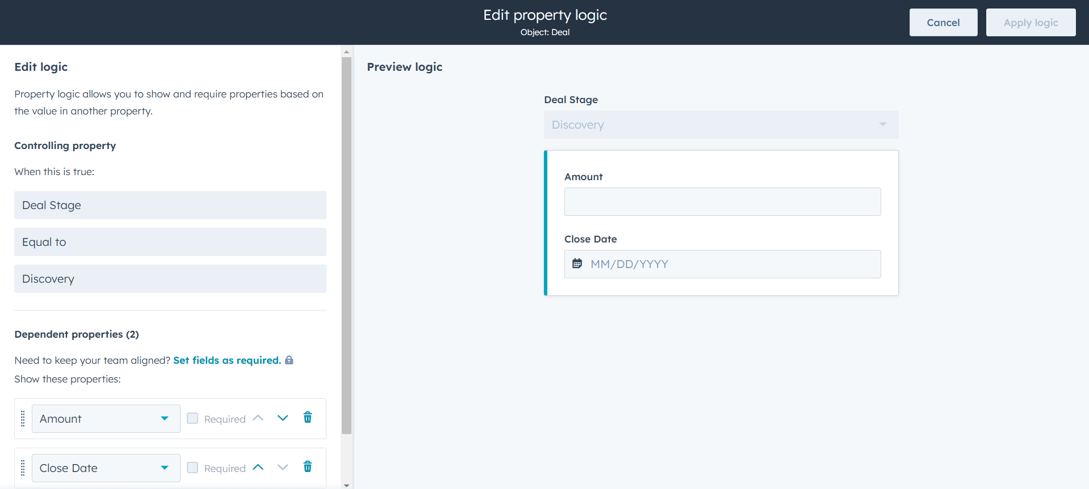
- Review stages and “pop up” questions at each stage: Check whether the fields asked at each stage are still relevant and if it should be required/optional.
- Standardise across teams: Ensure that all teams are using the same pipeline stages to avoid confusion and ensure consistency.
5. Clear Out Unused or Redundant Workflows
- Audit existing workflows: Review your workflows to see which ones are still functioning as needed, check if the name of the workflow reflects its purpose.
- Delete redundant workflows: If a workflow is no longer serving its purpose or has been replaced by a more efficient one, delete or archive it.
- Optimise workflows: Ensure your key workflows are still optimised for efficiency and relevance, especially as your business evolves. Remember to update your CRM data dictionary as needed.
A systematic workflow management system will prevent confusion and ensure smoother automation. Especially for growing teams across the business sharing the same data source and CRM platform. Don’t underestimate the power of naming convention!
6. Enhance Data Quality with Standardised Inputs
One major issue that arises in CRMs is inconsistent data entry. Different users may input data in different formats and definitions, which leads to cluttered and confusing reports. Imagine if one team member has been inputting Total Contract Value in Deal Amount and another using Annual Contract Value?
- Create data entry standards: Ensure all CRM users are following a standardised format for entering contact details, addresses, phone numbers, and more.
- Implement required fields: Set certain fields as mandatory to ensure essential data is collected.
- Shared definitions and purpose: Make sure everyone has the same definition of the property and usage/purpose of the data.
- Use validation rules: Prevent incorrect or inconsistent data from being entered by enforcing validation rules for specific fields.
7. Backup and Archive Historical Data
While cleaning up your HubSpot CRM, make sure you don’t lose important historical data:
- Export key data: Before deleting or archiving any information, export important data, such as contact lists, reports, and deal histories.
- Archive old deals: Close out deals that have been stuck in your pipeline for months and don’t show signs of moving forward.
- Use a CRM backup solution: Consider using third-party backup tools to store your CRM data safely.
This will protect valuable business intelligence while keeping your active CRM manageable.
8. Enrich Your CRM Data
Once your CRM is clean, the next step is enrichment. Data enrichment adds context to your existing records by filling in missing information and updating outdated details, so your team spends less time researching and more time talking to the right people.
Enrichment Inside HubSpot
HubSpot has data enrichment built in. It can fill in contact and company details such as company size, industry and location from its own data set. Enrichment now runs on HubSpot credits, so each enriched record uses credits from your account's monthly allowance, and buying more costs extra. Before you switch on automatic enrichment for your whole database, decide which records are worth enriching (for example, new leads and target accounts rather than every old contact), check how many credits that will use, and test it on a small segment first. If you need help with the credit side, our post on how HubSpot credits work covers it.
You can also use other data enrichment tools like Apollo and ZoomInfo if you need deeper contact data or you're not on HubSpot. Whichever tool you use, enrich after you clean, not before, so you aren't paying to enrich records you're about to delete.
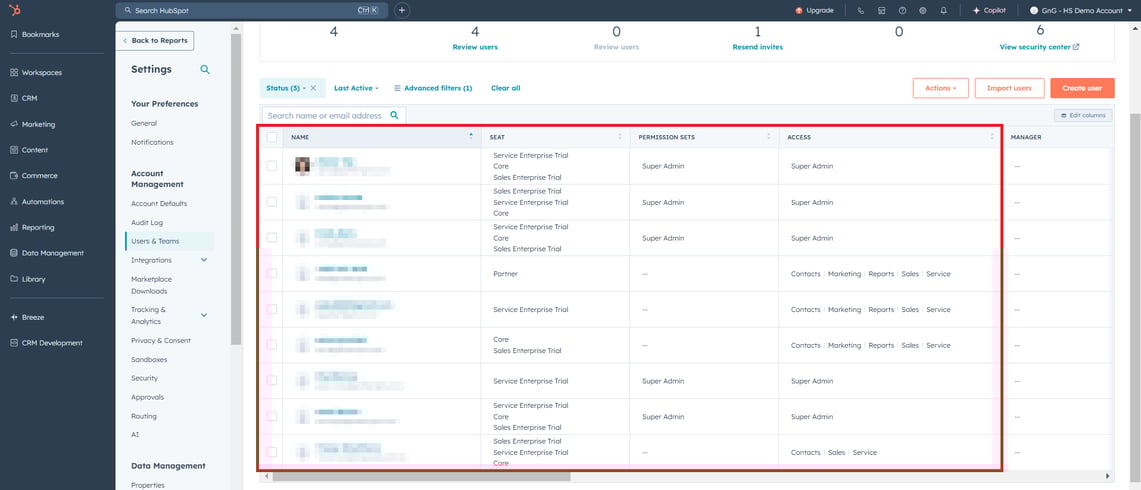
9. Review and Edit Users and Teams Permission Levels
Regularly reviewing and editing users and teams' permission levels isn’t just about security (though that’s a big one); it’s also about efficiency and clarity.
- Protect Sensitive Data: Not everyone needs to see everything. By limiting access to confidential information, like financial details or customer contracts, you reduce the risk of accidental (or intentional) misuse.
- Avoid Workflow Chaos: When team members have unnecessary permissions, they might unknowingly make changes that disrupt workflows or automation. Keeping permissions tailored to roles helps everyone stay in their lane.
- Improve Team Efficiency: Give your team exactly what they need to do their job, and nothing more. This ensures focus and removes the clutter of irrelevant data or tools that can slow them down.
10. Review Your Major Handoff Points Between Teams and Lead Allocation Workflows
Smooth handoffs between teams can make or break your lead management process. Whether it's forms capturing the wrong data, workflows misfiring, or tasks not being assigned, a small hiccup can snowball into missed opportunities. Here’s what to check:
- Forms: Ensure forms are collecting the right information and routing leads to the correct workflows.
- Workflow Errors: Test your workflows for misfires, incorrect triggers, or outdated steps that cause delays.
- Task Notifications: Confirm task assignments and notifications are landing in the right hands, at the right time.
11. Delete and Create Reports and Dashboards
Your reports and dashboards should work for you, not collect digital dust. Over time, it's easy to accumulate outdated or unused reports that clutter your view and slow your team down. Here’s how to get started:
- Delete or Archive Unused Reports: If they’re irrelevant, outdated, or no longer helpful, delete them to keep things clean.
- Check for Relevance: Are the reports still aligned with your goals? If not, tweak them to reflect current priorities or create new ones to fill gaps.
- Evaluate Dashboards: Are the reports within still used by the team? If not, update them or retire the dashboard altogether to simplify your view.
A lean, purposeful reporting setup makes it easier to track progress and focus on what really matters.
12. Write and Update Standard Operating Procedures (SOPs)
SOPs keep your team aligned and make sure everyone knows what to do and how to do it. It's easy to think you don't need them until someone leaves or a process breaks. Here’s how to keep it in top shape:
- Capture Current Processes: Review your workflows and document what actually happens, which isn't always what's supposed to happen. This helps eliminate guesswork.
- Update for New Tools and Changes: Using new features, like HubSpot AI? Your SOPs should reflect these changes so your team is always on the same page.
- Keep It Clear and Accessible: Avoid jargon and keep instructions simple. Store SOPs in a shared, easily accessible space so no one’s hunting for them in a pinch.
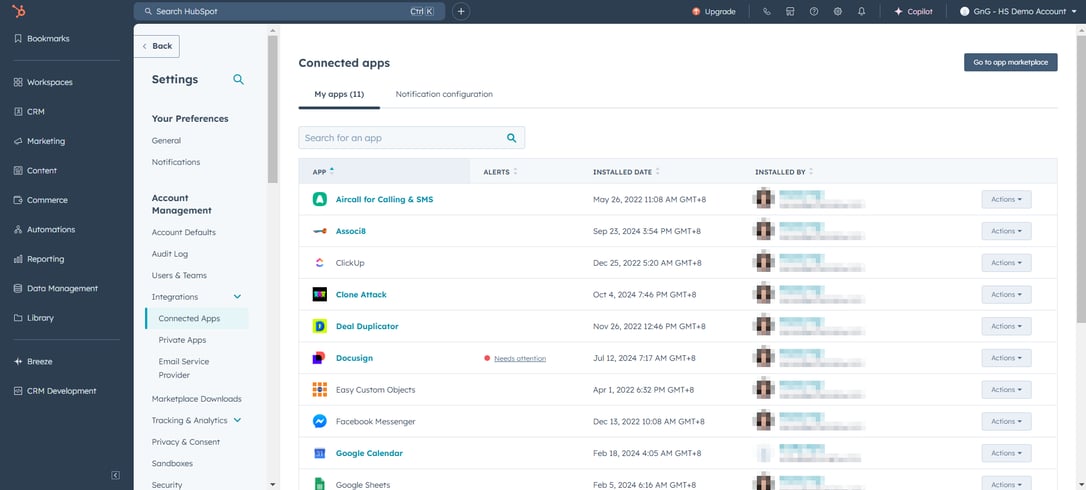
13. Review Your Integrations
Integrations are the backbone of a well-connected CRM but can also complicate data and workflows if not managed properly. To keep everything running smoothly:
- Identify Active Integrations: Review all active integrations to understand who set them up, why they’re in place, and how they’re being used.
- Evaluate Impact: Assess how each integration affects your CRM data and processes, ensuring there’s no duplication or unnecessary complexity.
- Document Everything: Maintain clear records of all integrations, including their purpose, setup details, and any dependencies.
Your Path to a Cleaner, Smarter CRM
A clean and well-maintained HubSpot CRM is the backbone of efficient operations and meaningful customer experiences. By tidying up your data, refining processes, and updating strategies, you set your sales, marketing, and service teams up for success.
When it’s a quieter time for your business, it’s the perfect time to step back, clean up, and ensure your CRM is ready to fuel your business goals in the months ahead. Think of it as hitting refresh for your systems and your team.
If you'd like a clear list of what to fix first, a HubSpot audit is a good place to start. See our HubSpot audit.