
Most revenue teams don't get much time to look at how they work. Leads need chasing, deals need closing, customers need looking after, and the systems behind all of it get patched as you go. New hires learn the CRM from whoever sits next to them. Automations pile up. Reports take longer to pull every quarter.
Want it as a printable checklist? Download the free RevOps planning checklist, with every question in this post ready to work through with your team.
That's normal. It's also why it's worth stopping a couple of times a year to review the whole thing properly: the people, the processes and the platform that hold your revenue together. A natural time is before a new financial year or a new planning cycle, but any quieter stretch works.
This checklist is the set of questions we work through with clients when we review their revenue operations. It's written with HubSpot in mind, but almost all of it applies to any CRM.
A quick recap: what RevOps is for
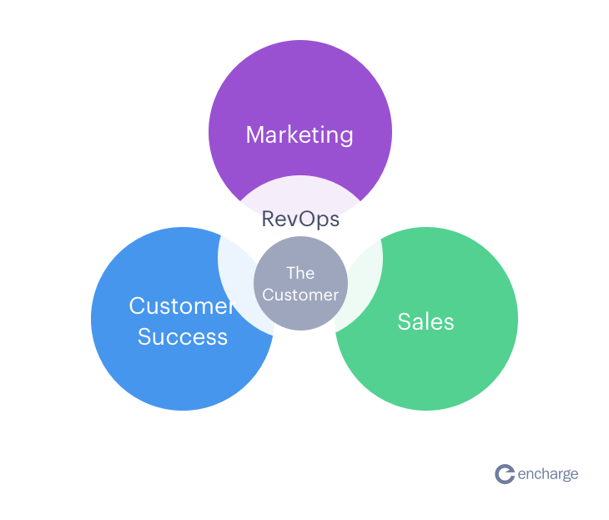
Revenue operations (RevOps) brings marketing, sales and customer success onto one set of goals, one set of data and one connected set of systems. If you want the longer version, read our explainer on what revenue operations is and when you need it.
Without it, each team tends to have its own process, its own KPIs and its own spreadsheet. The data doesn't join up, so decisions get made on partial information. Customers feel it too. Nobody likes repeating their goals and problems every time they speak to someone new at the same company.
The purpose of RevOps is to:
- Give the whole revenue team unity and clarity
- Improve efficiency
- Make revenue more predictable
- Reach revenue goals together
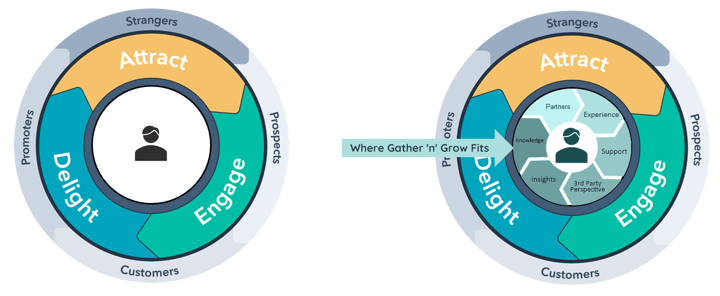
The three Ps
- People: a consistent customer experience at every stage of the journey.
- Process: team KPIs tied to revenue, and processes that repeat and scale.
- Platform: a CRM data strategy that lets you pull insight out easily.
The aim is to move away from disconnected customer experiences, disjointed systems, siloed data, outdated tools, unaligned KPIs and double handling.
What a good RevOps review leads to
We've worked through this process with businesses from SaaS to manufacturing, from scale-ups to enterprise. The work usually involves restructuring an existing CRM so the right data sits in the right place, or migrating out of spreadsheets, Salesforce, Pipedrive or Microsoft Dynamics into HubSpot. Every business ends up with an architecture specific to how it sells.
When it's done well, teams trust their data, everyone knows what they need to do in the CRM and why, dashboards update on their own instead of being rebuilt every month, and sales conversations about deals and leads get more useful.
Here's the checklist, split by part of the revenue team. Don't try to fix everything at once. Mark what's a clear no, pick the few that matter most this quarter, and start there.
CRM data
If spreadsheets, old email threads and scattered notes have stopped working, you've outgrown them. If you already have a CRM but it's starting to pinch as you grow, that's worth facing early. Changing CRMs later is a bigger job.
Strategy
- Do you have a written CRM strategy or plan?
- Is your CRM one your business can scale with?
Support and training
- Is there a named person or team responsible for updating the CRM when processes and goals change?
- Is CRM usage consistent across the team?
- Is there a naming convention everyone understands?
- Do new users get trained before they start working in the CRM?
- Has the team changed enough that user access needs reviewing?
- Is the number of Super Admins kept small?
- Do you have a data dictionary of shared terms and how each field is used? This matters more the faster the team grows.
Data management
- Which handful of fields drive your automations and reporting? Spot check them regularly, and put logic in place that catches errors early.
- Do you have custom properties nobody uses?
- Is importing limited to a few people?
- Is there a standard process for updating records, importing data and naming things?
- Are you using data in line with GDPR or your local privacy rules?
- Have you reviewed your integrations lately? Old ones are often left connected long after anyone needs them.
- Is the CRM set up so it's easy for the team to enter data?
- Is the data structured so people can get what they need out of it without help?
- Do you dedupe contacts and companies, and is there a regular plan to keep doing it?
- The big one: can you pull business insight from your CRM, and do you trust it? If yes, what else do you want to know? Work backwards from there.
- Do you have a dashboard that shows data quality issues, such as missing owners, missing lifecycle stages or duplicates? We set one up for every client we work with.
Marketing operations
Strategy
- What are next quarter's goals and KPIs, and how will you track them?
- What new initiatives or experiments do you want to run? Keep a running list of ideas.
- Do you review email performance on a regular cadence, especially bounce and spam rates?
- How fast do your key pages load, and is there a plan to improve them?
- Walk through the experience as a prospect. Take the same steps they would, online and offline, and note every question, concern or bit of friction.
Support and training
- Is there a central document covering naming conventions, live automations and lifecycle stage definitions?
Alignment and SLAs
- Is the handoff from marketing to sales clear? Where is there still friction?
- How are you tracking the SLA between marketing and sales on lead quality and follow up?
Tech stack
- Can you see page visits, email engagement and form submissions on the contact record?
- Is one person or team responsible for building automations? Workflows built in isolation tend to clash with each other.
- Do your tools let you control who can edit which assets, with an approval step where it matters?
- Which marketing tools are you paying for but not using?
- Which tools do you wish talked to each other? Are your existing integrations set up properly?
- If you run regular campaigns or events, how much of the build is repeated from scratch each time?
- Can marketing build and update pages without waiting on a developer?
- Are you using personalised content where it would make a real difference to the visitor?
Tracking and reporting
- Can you tie marketing campaigns back to deals and revenue?
- Are there automations running that should be switched off, or rebuilt more simply?
- Are there draft and test assets that should be archived?
- Are there unused or duplicate forms? Duplicates cause tracking problems later.
- How long does it take to pull a basic marketing report? Basic ones should take minutes.
- Are your ad accounts connected to your CRM so you can see which contacts came from ads and what they did next?
- Do you have a consistent UTM convention, including for partner sites, sponsored content and offline sources?
- Can you segment your database in minutes without exporting to Excel?
Sales operations and enablement
Strategy
- Set aside time with marketing to review how leads are performing, what sales needs from marketing and what marketing needs from sales.
- Compare the quality and performance of inbound and outbound leads.
- Does sales have current, relevant content to use through the sales process?
- What does growth look like over the next year and the next few years?
- Walk through the sales process as a rep. Note the inefficiencies and bottlenecks.
- Walk through the sales process as a prospect. Note the questions and concerns that come up.
- What skills are missing from the team?
Support and training
- Are you using playbooks, email templates and sequences so new reps get up to speed quickly and consistently?
- If yes, do they need updating?
- If not, where would they help most?
- Which repetitive tasks are still done by hand?
- Does the sales team follow one shared process in the CRM, or is everyone doing it their own way?
- Is the CRM set up to make data entry easy?
Alignment and SLAs
- When did you last review the marketing to sales handoff?
- Does territory planning need adjusting? Think through the knock-on effects before you change it.
Tech stack
- Does the sales team have the tools it needs? Which tools are underused? Are they connected to the CRM?
- Do you need data enrichment, and how will you keep its cost and quality in check?
Tracking and reporting
- Are your dashboards giving you real insight into the team, deals, process, SLAs and KPIs? If not, start from the questions you want answered.
- Do you have individual rep dashboards for one-to-ones?
- How do you measure sales performance and forecast accuracy?
- Does the sales manager get notified when a large or complex deal needs their help?
- Where are the biggest drop-offs in the pipeline, and at which stage do deals most often go to closed lost?
- Which part of the process has the most friction?
If you work in sales ops and haven't read The Sales Acceleration Formula by Mark Roberge, it's worth your time. Here's his talk: The Sales Acceleration Formula | Mark Roberge | Talks at Google
Customer service and success
Strategy
- Walk through the process as a member of the team, and again as a customer. Note the friction, questions and gaps.
- Do customers have an easy way to give honest feedback on the service and on what would help them?
Support and training
- The job of customer success is to retain and grow accounts. That needs a structured plan and proactive action.
- Are check-in tasks created automatically from triggers or dates?
- Are quarterly business reviews scheduled automatically?
- Are customers tiered so time goes where it matters most?
- Do customers know what to expect from you?
- Do your customer success managers manage accounts in a consistent way?
- Is the team trained to spot problems before the customer raises them?
- Are you using playbooks, email templates and task queues so the process scales?
- Do they need updating?
- Is onboarding automated, including the emails?
Alignment and SLAs
- Is there a clear, visible way to escalate urgent issues to management?
- When did you last review the sales to customer success handoff?
- Does the team have the collateral it needs for customer conversations?
Tech stack
- Which steps does the team most often miss?
- Which repetitive tasks are still manual?
- If you need tools outside the CRM, for product usage data for example, are they connected to it?
Tracking and reporting
- How are you measuring response time, customer satisfaction and account health?
- If you're in SaaS, are you tracking expansion, churn, average MRR and lifetime value?
- Does the team have team and individual dashboards for KPIs, SLAs and anything slipping through the cracks?
- What are your leading indicators? In SaaS, product adoption is usually the main one. Outside SaaS, work out which early signals predict renewal. This article on leading vs lagging indicators is a good primer.
Where to start
Every business has different processes, goals and KPIs, so the plan should fit yours. Bringing the information spread across your teams and systems into one place is usually the step that helps most, both for your bottom line and for your customers.
If you'd like help working through this, we can act as your fractional RevOps team and run your HubSpot, Google Ads and AI alongside you. See how fractional RevOps works.